
This simple article illustrates how to monitor the network throughput using some simple shell applications.
Many times you might need to see what is the actual speed of your network connection or, more often, you just need network transfer rate info to know when a damn file transfer will complete.
As usual, this article is based on UBUNTU and therefore I use in my examples the DEB package manager (for RPM system, I am sorry  )
)
Ok, let’s start, what we are going to use, two simple tools, nload and iftop.
Both nload and iftop are not shipped to you by the most common linux/unix distributions therefore, you need to install them.
To install the 2 applications, you need any shell program, in my examples I use bash, feel free obviously to use the same commands on whatever is your preferred shell program.
Install nload:
sudo apt-get install nload
nload is quite a small application, it takes less than 150 KB of disk space (in my case, with the current version in the Ubuntu’s applications repository).
Install iftop
sudo apt-get install iftop
iftop is even smaller than nload, less than 120 KB
Once you installed the 2 applications, you can easily use them.
Just remember that in order to use iftop, you need super user access rights.
>>> nload <<<
To load nload, just run the command:
nload
After that, you will get a screen like the following:
As you can see, nload just displays, using text mode graphs, the current throughput of the default NIC (in my case eth0) reporting inbound and outbound traffic).
I find this program awesome and I love it. It just does its job, in a perfect way, full stop.
>>> iftop <<<
Iftop application aims, from my perspective, to do something similar to the "top" command,
To load iftop, use the command:
sudo iftop
This should load the iftop application with a look similar to the following:
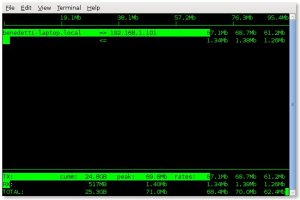
I love this application too, it makes easy the monitor of the bandwidth utilization and, in addition to that, it can also report the destinations of the network traffic.
Both applications are great, which one is the one to use, just depends on you and in the spefici, on your needs.
 Maurizio Benedetti's Blog